


Poor Aluminum Surface Finish on a Milling Machine: Causes and Fixes
Streaks, chatter marks, or aluminum welded to the cutting edge can turn a routine milling job into costly rework. Poor aluminum surface finish on a milling machine often comes from built-up edge, chip recutting, unsuitable cutting parameters, or insufficient rigidity—not simply a worn tool. The fastest route to a cleaner surface is to match the visible defect to its likely cause before changing settings.
Before polishing away the evidence, inspect the part under angled light. Note whether the defect appears across the entire surface, only in corners, or after several minutes of cutting. Those details help separate a tooling problem from vibration, heat, or chip accumulation.
Read the Surface Before Adjusting the Milling Machine
These patterns are clues rather than proof. A vibrating cutter can also develop built-up edge, while trapped chips may damage an otherwise sharp tool. Stop the spindle and isolate the machine before inspecting tooling or removing chips.
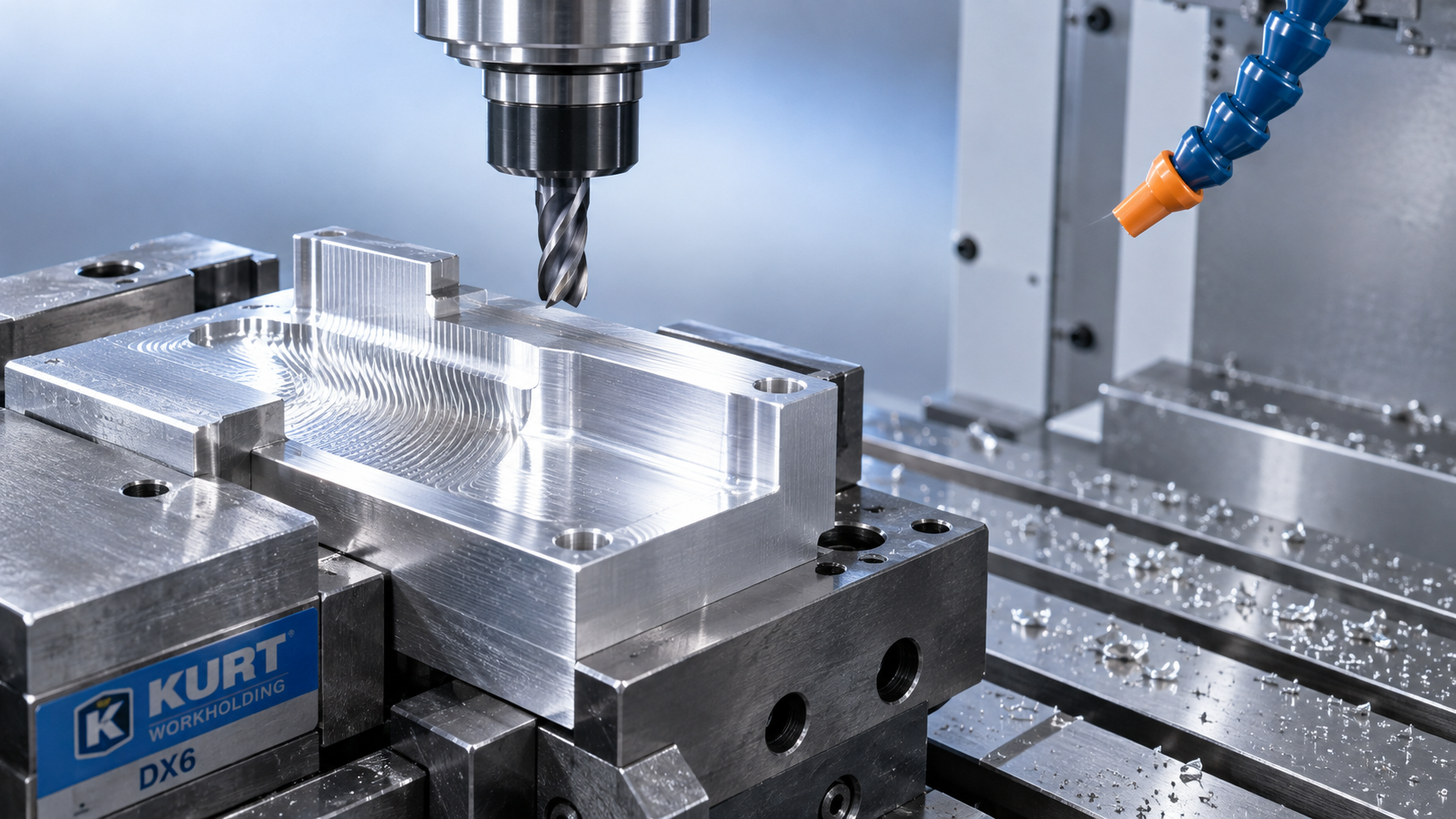
When Aluminum Sticks to the Cutting Edge
Aluminum can adhere to the tool and form a built-up edge. That deposit changes the cutting geometry, then breaks away unpredictably, dragging or tearing the finished surface. A cutter may still look serviceable from a distance while producing increasingly rough parts.
Under suitable magnification, look for aluminum deposits on the rake face and around the cutting edge. If adhesion returns quickly after cleaning or replacement, address the cutting conditions rather than repeatedly changing tools.
- Choose aluminum-specific geometry. Sharp, positive-rake edges and polished flutes generally reduce adhesion and help chips escape.
- Leave room for chips. Two- or three-flute end mills are common choices for aluminum, particularly in slots and pockets. Higher flute counts can work when engagement and evacuation allow.
- Use an appropriate tool surface. Uncoated polished carbide and coatings intended for aluminum are options; a coating suited to steel is not automatically suitable for aluminum.
- Deliver lubrication to the cutting zone. An aluminum-compatible coolant or properly applied minimum-quantity lubrication can reduce friction and welding.
Check coolant concentration against the fluid supplier’s recommendation and confirm that nozzles reach the engaged edge. Increasing flow will not solve a blocked delivery path. Dry machining can work in some applications, but it should not be the default response to persistent adhesion.
Balance Speed and Feed—Do Not Just Slow Everything Down
Reducing feed often feels like the safest response to poor finish. Yet feeding too slowly can make the edge rub instead of cutting cleanly. Heat and adhesion then increase, even though the machine sounds less heavily loaded.
Start with the tool manufacturer’s cutting-speed and chip-load recommendations for the alloy, cutter diameter, and engagement. Wrought aluminum and abrasive, high-silicon cast aluminum do not necessarily behave alike.
For metric calculations:
- Spindle speed, rpm = cutting speed, m/min × 1,000 ÷ (π × tool diameter, mm)
- Feed rate, mm/min = rpm × flute count × feed per tooth, mm
As a calculation example—not a universal cutting recommendation—a 10 mm, three-flute cutter at 300 m/min requires approximately 9,550 rpm. At 0.04 mm per tooth, the corresponding feed is approximately 1,146 mm/min. Confirm that the machine, holder, tool, and setup can support those conditions.
If spindle speed is limited, recalculate feed to maintain an appropriate chip load. At low radial engagement, chip thinning may require further adjustment using the tool supplier’s guidance. Changing rpm without considering feed changes what each edge actually cuts.
What if the marks look like chatter?
Chatter is not always cured by reducing speed. A controlled spindle-speed change may move the process away from a resonant condition. Keep feed per tooth in mind, and reduce radial or axial engagement if cutting forces exceed the setup’s stability. Change one variable at a time so the result remains useful.
Check the Setup Before Blaming the Cutter
A sharp tool cannot compensate for a flexible setup. Long tool stickout, dirty holder tapers, loose fixtures, or unsupported walls allow the cutting edge and workpiece to move relative to each other.
Use the shortest practical tool projection. Clean and inspect the holder and spindle interface, then measure runout where it matters: near the cutting end. Excessive runout makes one flute do disproportionate work, leaving uneven marks and accelerating wear.
On thin parts, clamp near the cutting zone and support the material without distorting it. More clamping force is not always better: a plate machined flat while bowed in a vise may spring back after release. If adjacent face-milling passes leave steps, check spindle tram, insert seating, and workpiece movement before changing feed.
Machine suitability matters, too. Shandong VEDON Intelligent Equipment Co., Ltd. supplies CNC machine tools and precision cutting tools, but equipment must match the operation. Its VD38E is a magnetic drilling machine, not a substitute for a milling machine. A magnetic base cannot attach directly to aluminum; any drilling arrangement requires manufacturer-approved mounting and secure restraint. Magnetic holding force alone does not establish suitability for lateral milling loads.
Keep Chips Out of the Finishing Pass
Random scratches often come from recutting rather than incorrect feed. Aluminum chips trapped in a pocket can be swept between the cutter and the finished wall, damaging a surface that was clean moments earlier.
Direct coolant or an appropriately guarded air stream toward the evacuation path, not simply toward the tool shank. Follow shop requirements for flying chips, mist control, and compressed-air use. Never clear chips by hand near rotating equipment.
For deep slots or pockets, reconsider the toolpath if chips have nowhere to go. Lower radial engagement, suitable roughing strategies, and a separate finishing pass can improve consistency. Leave a controlled finishing allowance: too much stock overloads the finishing tool, while an extremely light skim may rub instead of cutting.
A Practical Recovery Sequence
- Preserve the evidence. Photograph the surface and record where the defect occurs.
- Inspect with the machine safely stopped. Check adhesion, edge damage, holder cleanliness, runout, and workholding.
- Restore lubrication and evacuation. Confirm delivery reaches the cut and chips leave the finishing area.
- Verify the cutting data. Compare speed, feed per tooth, and engagement with tooling recommendations.
- Make one controlled trial. Use a test piece or safe allowance, then inspect before proceeding.
If the drawing specifies surface roughness, verify it with suitable measurement equipment; a bright surface is not necessarily within tolerance. Record the alloy, tool, overhang, coolant condition, and successful settings. That turns a frustrating repair into a repeatable process—and makes the next poor aluminum finish much easier to diagnose.

Vedon
Typically replies within minutes
Any questions related to Home?

Elaine / Sales Director

Jaye / Sales Manager

Jessica / Sales Manager